
Free AI tools & Creatives Apps
- Nano Banana : https://nanobanana.ai – Générateur et éditeur d’images AI gratuit basé sur Gemini (édition photo par texte).
- OpenClaw : https://openclaw.ai – Agent AI autonome open-source pour tâches via messagerie (Claude, GPT).
- ViralityAI : https://virality.ai – Idées de contenu viral pour Instagram (analyse tendances et métriques).
- Claude AI : https://claude.ai – Assistant AI conversationnel d’Anthropic (gratuit avec limites).
- Microsoft Copilot : https://copilot.microsoft.com – IA multimodale Microsoft (chat, images, code).
- Perplexity AI : https://www.perplexity.ai – Moteur de recherche AI avec citations sources.
- Bing Image Creator : https://www.bing.com/images/create – Générateur d’images DALL-E gratuit via Bing.
- Grok : https://grok.x.ai – IA xAI (chat, raisonnement, gratuit).
- Playground AI : https://playground.ai – Création d’images AI (1000/jour gratuit, watermark).
- Runway ML : https://runwayml.com – Génération vidéo AI (crédits gratuits limités).
- Pika Labs : https://pika.art – Vidéo AI à partir de texte/images (tier gratuit).
- ElevenLabs : https://elevenlabs.io – Synthèse vocale AI réaliste (crédits gratuits).
- Audacity : https://www.audacityteam.org – Éditeur audio open-source gratuit.
- DaVinci Resolve : https://www.blackmagicdesign.com/products/davinciresolve – Logiciel montage vidéo pro gratuit.
- OBS Studio : https://obsproject.com – Streaming et enregistrement open-source gratuit.
- Blender : https://www.blender.org – Suite 3D complète open-source gratuite.
- Figma : https://www.figma.com – Design UI/UX collaboratif (plan gratuit).
- Photopea : https://www.photopea.com – Éditeur photo Photoshop-like gratuit en ligne.
- Deepseek : https://www.deepseek.com – Modèles AI open-source (codage, chat gratuit).
- QuillBot : https://quillbot.com – Outil reformulation/paraphrase AI gratuit.
- DeepL : https://www.deepl.com – Traducteur AI précis (gratuit avec limites).
- Tome : https://tome.app – Création présentations AI (plan gratuit).
- Gamma : https://gamma.app – Slides et pages AI (limité gratuit).
- Notion : https://www.notion.so – Espace travail tout-en-un (gratuit personnel).
- Zapier : https://zapier.com – Automatisation no-code (100 tâches/mois gratuit).
- HuggingFace Spaces : https://huggingface.co/spaces – Hébergement démos ML gratuit.
Major AI Coding Assistants
- Claude Code (Anthropic CLI) : https://code.claude.com/docs/en/cli-reference
- Gemini CLI (Google DeepMind) : https://blog.google/technology/developers/gemini-cli-open-source-ai-agent
- Codex CLI (OpenAI) : https://developers.openai.com/codex/cli
- Kiro CLI (AWS) : https://kiro.dev/cli
- Kiro IDE (AWS) : https://kiro.dev
- Antigravity IDE (Google DeepMind) : https://antigravity.dev
- GitHub Copilot (VSCode Extension) : https://github.com/features/copilot
- Cursor (AI-native IDE) : https://cursor.com
- OpenCode (Open-source CLI) : https://github.com/opencode-ai/opencode
- AdaL CLI (Self-evolving Coding Agent) : https://sylph.ai
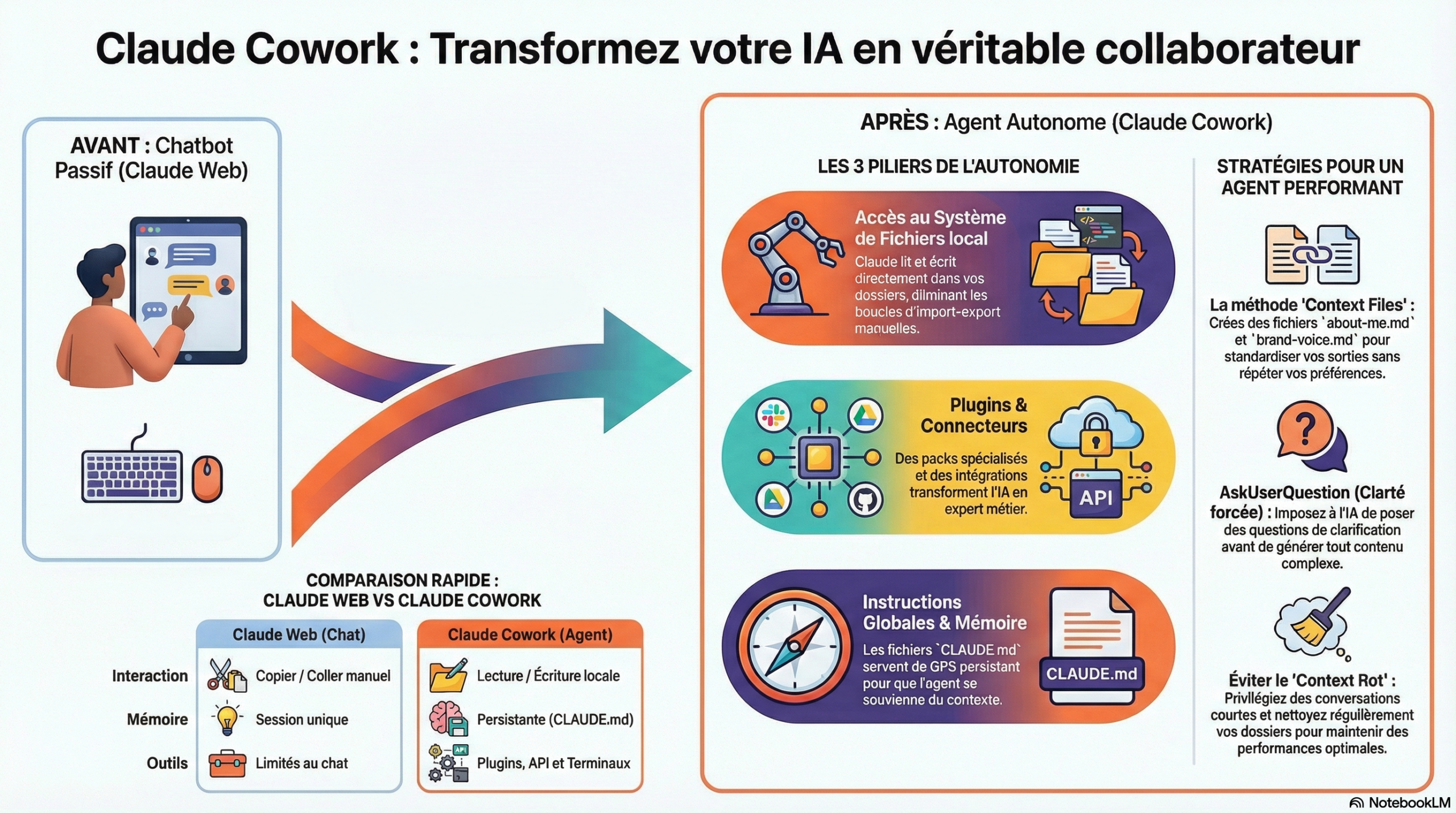
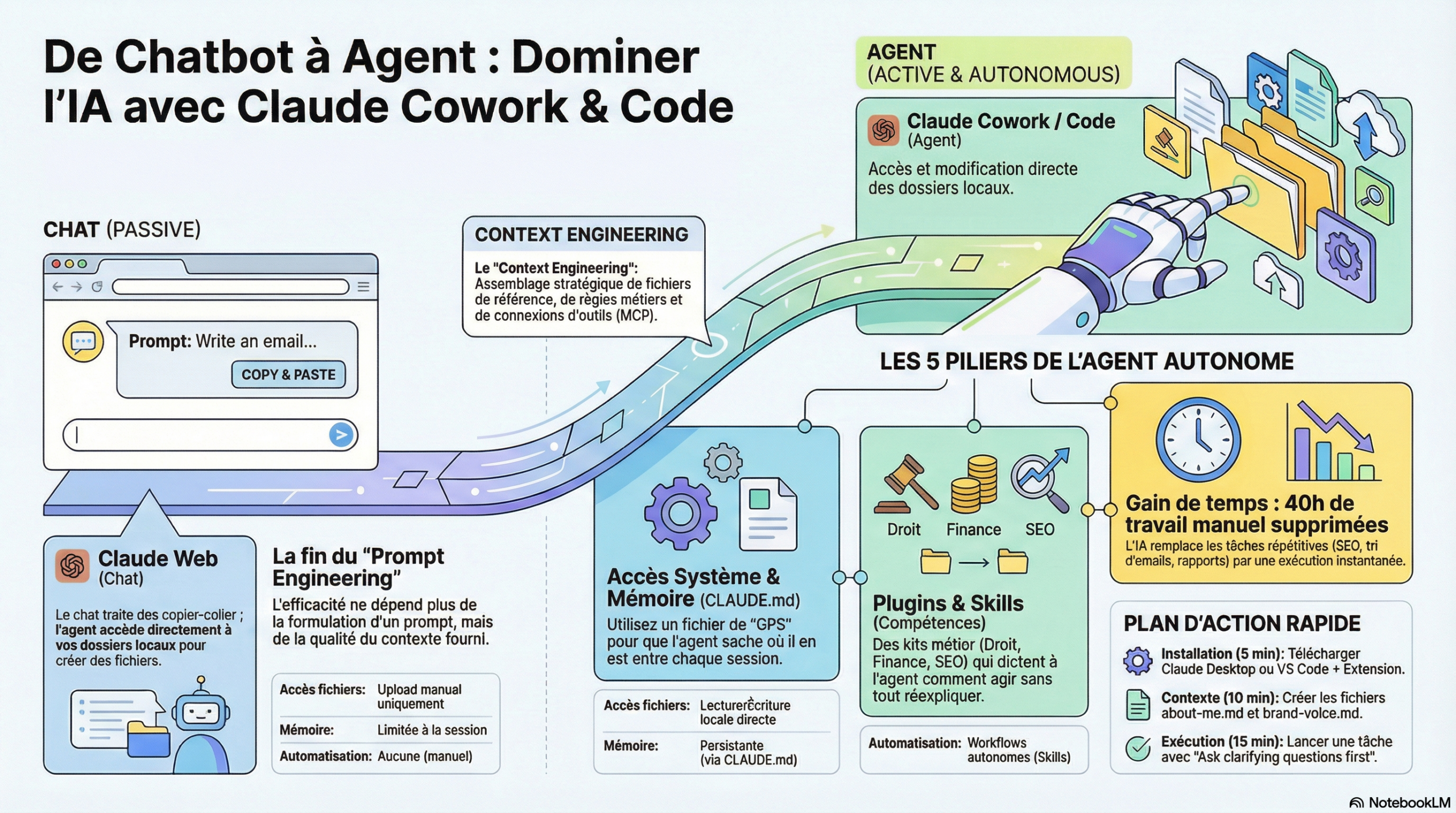
Claude has multiple layers
https://x.com/smratitiwa86867/status/2027319128923713990
Claude isn’t a chat app. It’s a multi-layer execution engine.
Claude has multiple layers: • Chat (ideas)
- Code (implementation)
- MCP (tool connections)
- Skills (reusable automations)
- http://CLAUDE.md (project memory)
But the real unlock?
→ Skills + MCP together.
When you:
- Connect your tools (GitHub, Notion, Slack, Vercel, etc.)
- Install reusable skills
- Give it persistent project context
This is how you:
- Auto-create PRDs from meetings
- Deploy apps without touching dashboards
- Generate reports, dashboards, docs in minutes
- Run workflows across your entire stack
That’s why I’m sharing this cheat sheet.
https://drive.google.com/open?id=10C43U6VMPCRumUVOR5UNgJ7bM9lMyJRV&usp=drive_fs
Claude-code-best-practice
It’s called « claude-code-best-practice » and it includes:
→ Production-ready agents
→ Memory that persists across sessions
→ Custom hooks and skills
→ Ready-to-use slash commands
Basically transforms Claude Code into a full autonomous coding team. 100% Opensource.
https://github.com/shanraisshan/claude-code-best-practice
CONCEPTS
| Feature | Location | Description |
| Skills | .claude/skills/<name>/SKILL.md | Reusable knowledge, workflows, and slash commands — load on-demand or invoke with /skill-name |
| Commands | .claude/commands/<name>.md | Entry-point prompts for workflows — invoke with /command-name |
| Sub-Agents | .claude/agents/<name>.md | Custom agents with their own name, color, tools, permissions, and model — usable as main agent or isolated subagents via the Task tool |
| Memory | CLAUDE.md | Persistent context via CLAUDE.md files and @path imports that Claude sees every session |
| Rules | .claude/rules/*.md | Modular topic-specific instructions with optional path-scoping via frontmatter |
| Hooks | .claude/hooks/ | Deterministic scripts that run outside the agentic loop on specific events |
| MCP Servers | .claude/settings.json | Model Context Protocol connections to external tools, databases, and APIs |
| Plugins | distributable packages | Bundles of skills, subagents, hooks, and MCP servers |
| Marketplaces | plugin registries | Host and discover plugin collections |
| Sandboxing | runtime config | File and network isolation that improves safety while reducing permission prompts |
| Output Styles | .claude/settings.json | Configurable response tone and format — Explanatory, Learning, or Custom |
| Settings | .claude/settings.json | Hierarchical configuration system for Claude Code behavior (37 settings, 84 env vars) |
| Permissions | .claude/settings.json | Fine-grained access control for tools and operations with wildcard syntax |
GLM5 Agentic Engineer
https://x.com/JulianGoldieSEO/status/2027303784381329516
China just released a free AI that writes your entire backend from one prompt.
You’re still paying developers thousands for this.
It’s called GLM5.
744 billion parameters. Fully open source. MIT license. Free.
Here’s the full stack combo:
Google Stitch = your frontend
→ Describe your app → Get full layouts, code, and components instantly → Export to HTML, CSS, or React in minutes
GLM5 = your backend
→ User authentication → API endpoints → Database schemas → Full server architecture
All from plain English prompts.
Here’s the exact workflow:
Step 1 → Prompt Stitch to design your dashboard or landing page
Step 2 → Export the frontend code
Step 3 → Prompt GLM5 to build the backend API that powers it
Step 4 → Connect them and deploy
Full stack app. Two prompts. Zero dev team.
What used to take a freelancer 3 weeks now takes an afternoon.
How To / Libraries / Code Sample
How to set up Claude Cowork (so it actually does your work while you step away)
https://industrious-author-b6e.notion.site/How-to-set-up-Claude-Cowork-so-it-actually-does-your-work-while-you-step-away-45b8b952cec6401189b0c64158bce5fe
Hugging Face just dropped universal skills for AI coding agents
Works with Claude Code, Codex, Gemini CLI, and Cursor.
https://github.com/huggingface/skills
Awesome LLM Apps : A curated collection of Awesome LLM apps built with RAG, AI Agents, Multi-agent Teams, MCP, Voice Agents, and more.
https://github.com/Shubhamsaboo/awesome-llm-apps
OpenClaw just got an unfair advantage over every other AI agent 🤯
It can now use Scrapling to scrape any website without getting blocked by Cloudflare. You don’t need to maintain selectors when websites update their structure.
https://github.com/D4Vinci/Scrapling
Check out Antigravity Awesome Skills – a massive library with 900+ AI agent skills for Claude, Copilot, Gemini, Cursor, and more. Automate workflows, search faster, manage GitHub tasks & unlock your AI’s full potential all in one place
https://github.com/sickn33/antigravity-awesome-skills
AI Agents 101: My comprehensive guide on how to build AI Agents that work.
https://x.com/vasuman/status/2011923440769659132
How to AI
https://ruben.substack.com
Claude Cowork expliqué à mon père
https://generationia.flint.media/p/claude-cowork-ecrire-memoires-avec-ia-guide-complet-2026
The Complete Guide to Building Skills for Claude
Anthropic just dropped a 33-page guide on how to build skills in Claude
https://resources.anthropic.com/hubfs/The-Complete-Guide-to-Building-Skill-for-Claude.pdf
Everything Claude Code. A complete system: skills, instincts, memory optimization, continuous learning, security scanning, and research-first development. Production-ready agents, hooks, commands, rules, and MCP configurations evolved over 10+ months of intensive daily use building real products.
https://github.com/affaan-m/everything-claude-code
Google AI Professional Certificate from #GrowWithGoogle
https://x.com/Google/status/2024507514117669229
https://grow.google/intl/fr_fr/
https://grow.google/intl/fr_fr/courses-and-tools/
Google vient de lancer Google Skills. Une plateforme où tout le monde peut apprendre l’IA, le code et la tech depuis zéro, avec certificats à la clé.
https://www.skills.google
Droidclaw turn old phones into ai agents
https://droidclaw.pages.dev
Build Website with Claude + Gemini
https://x.com/JulianGoldieSEO/status/2027318374968246556
Claude 4.6 and Gemini 3 together are wild.
This is the new AI product stack 🧵
Claude 4.6:
– 1M token context window
– Reads entire codebases
– Handles multi-step workflows
– Connects APIs cleanly
– Automates backend logic
Gemini 3:
– Multimodal (text, image, video, audio)
– Designs UI + layout
– Structures landing pages
– Powers AI-native dev (AntiGravity IDE)
Here’s the play:
- Prompt Gemini to design the landing page.
- Take output to Claude.
- Prompt Claude to build backend automation.
Result?
Lead form → email list → CRM tag → welcome sequence.
All built from prompts.
This is what a 2-person AI team looks like.
Complete website with Claude Opus 4.6 + Figma
https://x.com/Marryclaire_AI/status/2024159238537515360
BREAKING: AI can now build you a complete website in 2 hours (for free).
Here are 9 insane Claude Opus 4.6 + Figma Make prompts that create $5,000 websites in 2 hours:
I just built a $5,000 client website in 118 minutes.
The stack:
– Claude Opus 4.6 for architecture, logic & complex reasoning
– Figma Make for pixel-perfect UI, interactions & deployment
I tested 100+ prompts, so you don’t have to.
Here are the 9 prompts that actually work:
PROMPT 1: The Architecture Strategist
You are a Principal Architect at Vercel. I need to build a [WEBSITE TYPE: portfolio/saas/e-commerce].
Requirements:
– Target audience: [DESCRIBE]
– Key features: [LIST 3-5]
– Tech considerations: [RESPONSIVE/SEO/PERFORMANCE]
Deliver:
- Site map (all pages with hierarchy)
- User flows (3 primary journeys)
- Data models (if dynamic content)
- API requirements (if applicable)
- Component inventory (30+ components needed)
- Page templates (wireframe descriptions)
- Technical stack recommendation
- Performance budgets (load time targets)
- SEO structure (meta templates, URL patterns)
Format as a technical specification I can hand to Figma Make.
PROMPT 2: The Design System Generator
You are a Design Director at Apple. Create a design system for [BRAND].
Brand attributes: [MINIMAL/BOLD/LUXURY/PLAYFUL]
Generate:
- Color palette (primary, secondary, semantic, dark mode)
- Typography scale (9 levels with font recommendations)
- Spacing system (8px base grid)
- Component specs (30 components with states)
- Layout patterns (responsive breakpoints)
- Animation guidelines (easing, duration)
- Accessibility requirements (WCAG AA)
Export as:
– Design tokens (JSON)
– CSS variables
– Figma-ready component descriptions
I’ll paste this into Figma Make to generate the visual system.
PROMPT 3: The Content Architect
You are a Conversion Copywriter at Ogilvy. Write all copy for a [WEBSITE TYPE].
Brand voice: [PROFESSIONAL/CASUAL/BOLD]
Target: [AUDIENCE]
Goal: [CONVERSION/AWARENESS/RETENTION]
Deliver for each page:
- Hero section (headline: 6 words, subhead: 15 words, CTA)
- Feature sections (3 blocks with headlines + descriptions)
- Social proof (testimonial framework + stats)
- FAQ section (8 questions with answers)
- Footer (navigation, social, legal)
Formatting instructions:
– Use emotional triggers (urgency, scarcity, authority)
– Include power words (exclusive, proven, instant)
– Specify character counts for each element
– Note which text should be H1, H2, body
I’ll use this to populate Figma Make’s content layers.
PROMPT 4: The Component Logic Builder
You are a Frontend Architect. Design the logic for these interactive components:
Components needed:
- Multi-step form (validation, progress, state management)
- Dynamic pricing calculator (inputs, formulas, real-time updates)
- Search with filters (faceted search, sorting, pagination)
- User dashboard (data visualization, CRUD operations)
- Authentication flow (login, signup, password reset)
For each component:
– State machine diagram (describe in text)
– Data flow (props, events, API calls)
– Error handling strategy
– Loading states
– Empty states
– Edge cases
Generate React component structure (functions, hooks, handlers).
I’ll describe this logic to Figma Make to build the interactive prototypes.
PROMPT 5: The Figma Make Prompt Engineer
You are an AI Prompt Engineer specializing in Figma Make.
Convert this technical specification into 5 Figma Make prompts:
[PASTE SPEC FROM CLAUDE]
Each prompt must:
- Start with the outcome (not the process)
- Include brand context (colors, typography, mood)
- Specify interactions (hover, click, scroll, animate)
- Define responsive behavior (mobile/tablet/desktop)
- Request specific sections (hero, features, CTA, footer)
Example format:
« Build a [TYPE] website with [MOOD] aesthetic. Use [COLOR] primary and [FONT] typography. Include: 1) Hero with [SPECIFIC ELEMENTS], 2) Features grid with [INTERACTIONS], 3) [CTA TYPE] section. Make it fully responsive with [ANIMATION STYLE] animations. »
Generate 5 variations from simple to complex.
PROMPT 6: The Animation & Interaction Designer
You are a Motion Designer at Apple. Design interactions for [WEBSITE SECTION].
Interaction requirements:
– Page load sequence (stagger, duration, easing)
– Scroll behaviors (parallax, pin, reveal)
– Hover states (micro-interactions, feedback)
– Click transitions (page transitions, modal opens)
– Gesture support (swipe, pinch, pull)
Technical specs:
– Easing curves (spring, ease-out, cubic-bezier)
– Durations (ms for each interaction type)
– Performance considerations (GPU acceleration, will-change)
Describe the animations in words Figma Make can interpret:
« On scroll: Navbar shrinks from 80px to 60px with ease-out over 300ms. Hero text fades up from 20px below with 0.6s duration and 0.1s stagger between lines… »
I’ll paste these descriptions into Figma Make’s prompt.
PROMPT 7: The Responsive Behavior Strategist
You are a Responsive Design Specialist. Plan breakpoints for [WEBSITE].
Breakpoints:
– Mobile: 375px
– Tablet: 768px
– Desktop: 1440px
For each page section, define:
- Layout transformation (grid → stack, sidebar → drawer)
- Typography scaling (font sizes at each breakpoint)
- Image behavior (crop, scale, hide, swap)
- Navigation adaptation (hamburger, sidebar, horizontal)
- Spacing adjustments (padding, margin, gap)
- Content prioritization (hide secondary content on mobile)
Create a responsive decision matrix:
Section | Mobile | Tablet | Desktop | Notes
Figma Make will use this to generate fluid layouts.
PROMPT 8: The Data Integration Planner
You are a Full-Stack Architect. Design data integration for [WEBSITE TYPE].
Data sources:
– [CMS/API/DATABASE]
Requirements:
- Data models (schema definitions)
- API endpoints needed (GET, POST, PUT, DELETE)
- Authentication strategy (JWT, OAuth, API keys)
- Real-time considerations (WebSockets, polling)
- Caching strategy (CDN, local storage)
- Error handling (fallbacks, retries, offline)
User-facing features:
– Dynamic content loading (infinite scroll, pagination)
– Form submissions (validation, success/error states)
– User accounts (profiles, preferences)
– Search functionality (indexing, filters, sorting)
Figma Make connects to Supabase for real data—design the schema for this integration.
PROMPT 9: The QA & Optimization Checklist
You are a QA Engineer at Google. Review this website specification:
[PASTE FIGMA MAKE OUTPUT OR DESCRIBE]
Checklist:
□ Performance (Core Web Vitals targets)
□ Accessibility (WCAG 2.2 AA compliance)
□ SEO (meta tags, structured data, sitemap)
□ Security (HTTPS, CSP, input sanitization)
□ Browser compatibility (Chrome, Safari, Firefox, Edge)
□ Mobile optimization (touch targets, viewport)
□ Analytics integration (events, goals, funnels)
For each issue:
– Severity (Critical/High/Medium/Low)
– Location (page/section/component)
– Issue description
– Fix recommendation
Generate a punch list for the Figma Make iteration.
Complete website with Perplexiy + Replit
9 insane Perplexity + Replit prompts that create $5,000 websites in 2 hours
Prompt 1: Competitive Website Research (Perplexity)
« Analyze the websites of the top 5 competitors in [your industry]. For each, document: their homepage structure and sections, color schemes and design style, key features and calls-to-action, what makes their design effective, and common patterns across all of them. Cite specific examples with links. »
Prompt 2: Brand Identity System (Perplexity)
« Research the most effective color palettes, typography, and design trends for [your industry] websites in 2026. Recommend a complete brand system including: 5 hex colors (primary, secondary, accent, background, text) with psychological reasoning, 2 font pairings that work for this industry, design mood (minimal, bold, warm, etc.), and 3 websites that exemplify this style well. Cite design resources. »
Prompt 3: Site Structure and Copywriting (Perplexity)
« I’m building a website for [business description]. Research similar successful websites and recommend: the optimal page structure (what pages I need), homepage sections in order with what each should contain, 5 high-converting headlines for my hero section, key trust elements to include (testimonials, stats, logos), and SEO best practices for this industry. Provide examples with sources. »
Prompt 4: Build the Website (Replit Agent)
Open Replit. Start a new project. Use Replit Agent:
« Build a complete responsive website for [business name]. Use this brand system: [paste Perplexity output from Prompt 2]. Create these pages with this structure: [paste Perplexity output from Prompt 3]. Include: semantic HTML5, mobile-responsive CSS using Grid and Flexbox, smooth scroll animations, and a working contact form. Deploy it live when done. »
Prompt 5: SEO Foundation Research (Perplexity)
« Research SEO requirements for a [business type] website targeting [location/audience]. Provide: 5 optimized title tag templates, meta description formulas, schema markup I need (provide JSON-LD code), local SEO checklist if applicable, and the top 10 keywords I should target. Base recommendations on current search trends and cite sources. »
Perplexity gives you an SEO roadmap with real data and ready-to-use code.
Prompt 6: Implement SEO (Replit Agent)
In your Replit project, prompt the agent:
« Add complete SEO optimization to this website using this research: [paste Perplexity output from Prompt 5]. Implement: title tags and meta descriptions for each page, Open Graph tags, schema markup JSON-LD, proper header hierarchy, image alt text, and an XML sitemap. Ensure all code is in the correct HTML files. »
Replit applies everything Perplexity researched. No manual coding needed.
Prompt 7: Image Strategy Research (Perplexity)
« Research the most effective imagery styles for [your industry] websites. Recommend: specific image types needed (hero, features, about, etc.) with dimensions, whether to use photography vs illustrations vs AI-generated, 5 free stock photo resources for this industry, and detailed AI image generation prompts for Midjourney or DALL-E for each image type I need. Cite visual examples. »
Perplexity tells you exactly what images you need and where to get them.
Prompt 8: Add Images and Polish (Replit Agent)
« Enhance this website with visual elements. Add: placeholder image containers with proper aspect ratios for [list image types from Perplexity research], CSS animations for scroll effects, hover states on buttons and links, a mobile-responsive navigation menu, loading states, and smooth transitions between sections. Optimize all images for web performance. »
Replit polishes everything into a professional site that feels custom-designed.
Prompt 9: Pre-Launch Checklist (Perplexity)
« Create a comprehensive website launch checklist for a [business type] site. Include: technical checks (mobile responsiveness, load speed, broken links), SEO verification, accessibility requirements (WCAG compliance), browser compatibility testing, contact form testing, analytics setup, legal requirements (privacy policy, cookies), and post-launch monitoring. Provide tools to check each item. »
Perplexity gives you a professional QA checklist so nothing breaks after launch.
Claude Cowork for Local Domination
https://x.com/Suryanshti777/status/2027400439218700599
24) Market Share Mapping
“List top 20 competitors in [city] for [service]. Categorize by size, positioning, review count, estimated authority, and service focus.”
“Identify fragmented segments, underserved niches, and competitors with weak branding.”
25) Pricing Power Analysis – Competing on price is lazy.
“Analyze visible pricing, guarantees, and offer structure across competitors. Identify who is premium, mid-market, and budget.”
“Recommend optimal positioning for maximum margin while staying competitive in [city].”
26) Brand Perception Audit
Most local brands are forgettable.
“Analyze competitors’ messaging tone, visuals, trust signals, and differentiation. Identify patterns and sameness.”
“Develop a distinct brand angle that breaks pattern recognition while maintaining trust.”
27) Long-Term Moat Strategy
Short-term tactics fade.
“Based on all previous audits (SEO, reviews, backlinks, authority, offers), design a 12-month domination roadmap.”
- Content expansion
- Authority acquisition
- Review velocity targets
- Service expansion
- Automation milestones
Claude can now do SEO
https://x.com/bloggersarvesh/status/2022663312853598425
1. Claude Cowork can fully analyze your competition’s weaknesses.
« Scan these sites. What are these competitors’ sites missing? Find the content gaps and tell me 5 topics I should cover to be more helpful than them. »
If you provide more value, you win the #1 spot. Period.
2. Claude Cowork to do a full Schema audit for your business
“In chrome, open {{PASTE_URL}}. Check page source and list all schema. Say if LocalBusiness exists and if it’s useful. Output: (1) existing schema + verdict, (2) missing/weak schema + priority. For HIGH priority only, generate clean JSON-LD with placeholders. No guessing. No explanations. Be blunt.”
3. Claude Cowork can identify « Low-Hanging Fruit » keywords for your business.
« List 20 high-intent local keywords for a [Service] in [City] that indicate a customer is ready to buy NOW. »
Instantly, you will have a list of « near me » and « emergency » keywords that actually convert.
4. Claude Cowork can understand your business and competitors
“Open Chrome, visit my site {{MY_WEBSITE_URL}} and extract my business name, address, services, cities served and key selling points, then open these competitors {{COMP1}}, {{COMP2}}, {{COMP3}} and extract their services, target locations, strengths and trust signals, compare me vs them.”
5. Claude Cowork can dominate the Google Business Profile (GBP) feed.
« Analyze these [XYZ. com] competitor GBP posts by opening their GBP in Chrome. Identify their keyword gaps, then write 10 high-impact posts for my business in [City] that include local landmarks and a hard ‘Call Now’ CTA. »
Cowork does the heavy lifting while I take the #1 spot.
6. Use Claude Cowork to analyze competitor GBP posts and build a posting plan
“Open Chrome and review the Google Business Profile posts of these competitors: {{COMP1}}, {{COMP2}}, {{COMP3}}. Analyze their post types, posting frequency, content themes, offers, CTAs, media usage, and timing. Identify what patterns correlate with strong map rankings and engagement. Based on this analysis, create a clear, non-generic posting plan for my GBP that specifies post types, frequency, themes, and CTA style. Avoid vague advice. Make the plan directly actionable.”
7. Use Claude Cowork to do all the keyword research.
« Open Chrome, go to ahrefs and analyze my competitor XYZ. com’s top 20 pages, extract their target keywords, search volumes, and give me a prioritized list with difficulty scores in a spreadsheet. »
Done in 10 minutes. Not 10 hours.
« But wait, SEO can’t be automated. »
You’re right. It can’t. Not fully.
Claude Cowork doesn’t replace humans’ SEP expertise.
It replaces the 40 hours of busywork that stops most local businesses from ever doing SEO at all.
The strategy is still yours. The execution is now instant.
Réécriveur de CV
J’ai remplacé mon recruteur par CLAUDE.
Résultat : 5 entretiens en 14 jours.
Voici les prompts exacts qui ont tout changé.
https://x.com/EloiLJF/status/2027352646349173102
PROMPT 1 : Le Réécriveur de CV Impact Maximum
Le problème : Votre CV liste vos tâches. Les recruteurs cherchent vos résultats.
Prompt complet :
« Voici mon expérience professionnelle :
Rôles occupés : [LISTE TES POSTES] Compétences clés : [LISTE] Réalisations mesurables : [LISTE AVEC CHIFFRES]
Adapte mon CV pour un poste de [RÔLE SPÉCIFIQUE] dans [SECTEUR OU PAYS].
Exigences critiques :
→ Optimisation ATS : Intègre les mots-clés du secteur que les robots de recrutement recherchent → Verbes d’action puissants : Commence chaque bullet point par des verbes comme : Dirigé, Développé, Augmenté, Réduit, Optimisé, Lancé → Focus résultats : Chaque ligne doit montrer un impact mesurable (chiffres, %, délais) → Format ATS-friendly : Pas de tableaux, colonnes complexes, ou graphiques (les ATS ne les lisent pas)
Structure à suivre :
Pour chaque expérience, utilise ce format : [VERBE D’ACTION] + [CE QUE J’AI FAIT] + [RÉSULTAT MESURABLE]
Exemple : ❌ Mauvais : « Responsable de la gestion d’équipe » ✅ Bon : « Dirigé une équipe de 8 commerciaux, augmentant le CA de 34% en 6 mois »
Fournis la version complète réécrite de mon CV. »
Résultat :→ Taux de passage ATS : de 25% à 78% → Lectures complètes par recruteurs : +120% → Entretiens décrochés : x3
Ce qui change vraiment :→ Avant : « Gestion de projets clients » → Après : « Piloté 12 projets clients simultanés (budget total 2,4M€), livrant 100% dans les délais avec satisfaction client 4,8/5 »
PROMPT 2 : Le Customisateur CV Ultra-Ciblé
Le problème : Vous envoyez le même CV à 50 offres. Résultat : 0 réponse.
La solution : Un CV sur-mesure pour CHAQUE offre.
Prompt complet :
« Voici l’offre d’emploi que je cible :
[COLLE L’ANNONCE COMPLÈTE]
Et voici mon CV actuel :
[COLLE TON CV]
Mission :
Analyse comparative :→ Identifie les compétences mentionnées dans l’offre que je possède → Identifie celles qui me manquent ou sont sous-représentées dans mon CV
Réécriture stratégique :→ Réécris mon expérience pour matcher 80-90% des exigences → SANS inventer de compétences que je n’ai pas → SANS exagérer mes réalisations → En mettant en avant les expériences les plus pertinentes pour CE poste
Optimisation sémantique :→ Utilise exactement les mêmes termes que l’offre (si l’offre dit « gestion de projet agile », ne dis pas « méthodologie scrum ») → Intègre les technologies/outils mentionnés que je maîtrise → Reprends leur vocabulaire corporate (si eux disent « stakeholders », je dis « stakeholders »)
Gap analysis :→ Liste les 2-3 compétences qui me manquent vraiment → Suggère comment les compenser (formations en cours, projets perso, compétences transférables)
Fournis : → CV réécrit et optimisé pour cette offre → Liste des gaps identifiés → Recommandations pour combler ces gaps »
Résultat :→ Match avec l’offre : de 45% à 87% → Taux de réponse : de 3% à 28%
Temps d’exécution :→ 5 minutes par offre (vs 2h manuellement) → Scalable : adaptez 10 CVs en 50 minutes
Astuce bonus :Sauvegardez chaque version customisée avec le nom de l’entreprise pour tracking.
PROMPT 3 : L’Optimiseur de Profil LinkedIn
Le problème : Votre section « À propos » LinkedIn ressemble à un CV ennuyeux.
La réalité : Les recruteurs passent 6 secondes sur votre profil. Votre « À propos » doit accrocher IMMÉDIATEMENT.
Prompt complet :
« Voici ma section À propos LinkedIn actuelle :
[COLLE TON TEXTE ACTUEL]
Réécris-la comme un résumé recruiter-friendly qui répond clairement à :
- Qui je suis (en 1 phrase percutante) → Pas : « Professionnel passionné par le marketing » → Mais : « Growth Marketer qui a généré 2,4M€ de revenus pour 3 scale-ups SaaS »
- Ce que je fais (valeur concrète, pas jargon) → Pas : « J’optimise les stratégies digitales » → Mais : « Je transforme le trafic payant en clients rentables (ROI moyen : 420%) »
- Les problèmes que je résous (pour qui et comment) → Exemple : « J’aide les startups B2B à passer de 0 à 100K€ MRR en réduisant leur CAC de 40% »
Contraintes :→ Longueur : 150-200 mots MAX (les gens ne lisent pas de pavés) → Ton : Confiant mais pas arrogant, professionnel mais accessible → Mots-clés : Intègre naturellement ces termes que les recruteurs recherchent : [LISTE 5-8 MOTS-CLÉS DE TON SECTEUR] → Call-to-action : Termine par une invitation claire (ex: « Discutons de vos défis en acquisition client »)
Format :→ Paragraphe 1 : Qui je suis + impact principal → Paragraphe 2 : Comment je le fais + compétences clés → Paragraphe 3 : Pour qui + CTA
Fournis la version réécrite. »
Résultat :→ Vues de profil : +180% en 2 semaines → Messages InMail de recruteurs : de 1/mois à 4/semaine → Demandes de connexion qualifiées : x5
Exemple transformation :
AVANT (générique) : »Professionnel du marketing digital passionné avec 5 ans d’expérience. Expertise en SEO, SEM, social media. Cherche nouvelles opportunités. »
APRÈS (impactant) : »Growth Marketer qui a généré 3,2M€ de revenus pour des scale-ups SaaS en 18 mois.
Je transforme des budgets marketing limités en machines d’acquisition rentables : SEO technique, paid ads (Google/Meta), et automation CRM. Résultat moyen : -45% CAC, +120% conversions.
J’aide les startups B2B (10-50 personnes) à structurer leur growth de 0 à 500K€ ARR. Parlons de vos défis acquisition 👇 »
Différence : Chiffres concrets, problème résolu, audience ciblée.
PROMPT 4 : Le Générateur de Lettre de Motivation Standout
Le problème : 90% des lettres de motivation sont ignorées. Pourquoi ? Elles sont génériques et sans valeur.
Prompt complet : Créé une lettre de motivation de 10-15 phrases
maximum pour ce poste :
[COLLE LA DESCRIPTION DU POSTE]
Contexte sur moi :→ Mon parcours : [RÉSUMÉ EN 2-3 PHRASES] → Ma réalisation la plus pertinente pour ce poste : [DÉCRIS AVEC CHIFFRES] → Pourquoi cette entreprise spécifiquement : [RAISON AUTHENTIQUE]
Structure obligatoire :
- 1 – Accroche personnalisée (2-3 phrases) :→ Commence par un fait sur l’entreprise qui montre que j’ai fait mes recherches → Connecte ce fait à mon expérience
Exemple : « J’ai remarqué que [Entreprise] a récemment lancé [Produit/Initiative]. Ayant dirigé un lancement similaire chez [Ancienne Boîte] qui a généré [Résultat], je comprends les défis que vous affrontez. »
- 2 – Valeur apportée (5-7 phrases) :→ Inclus UNE réalisation mesurable super pertinente pour le poste → Détaille comment mes compétences résolvent leurs besoins spécifiques → Utilise des chiffres concrets
- 3 – Call-to-action clair (2-3 phrases) :→ Demande explicite d’entretien → Mention de disponibilité → Ton : enthousiaste mais professionnel
Règles absolues :❌ Pas de : « Je suis très motivé », « passionné par », « ravi de postuler » ❌ Pas de répétition du CV ❌ Pas de fluff ou généralités ✅ Seulement de la VALEUR concrète
Ton : Collègue compétent qui propose une solution, pas candidat qui quémande.
Fournis la lettre complète. »
Résultat :→ Taux de lecture complète : 78% (vs 12% avec lettres génériques) → Mentions positives en entretien : « Votre lettre nous a marqués » → Différenciation immédiate vs autres candidats
Exemple de transformation :
AVANT (ignorée) : »Je suis très intéressé par le poste de Marketing Manager chez votre entreprise. Avec 5 ans d’expérience en marketing, je pense être un bon candidat. Je suis motivé et passionné… »
APRÈS (remarquée) : »Votre expansion de 300% sur le marché B2B en 2024 est impressionnante. Chez [Ancienne Boîte], j’ai dirigé une stratégie similaire qui a généré 2,4M€ de pipeline en 9 mois avec un budget limité à 80K€.
Je maîtrise exactement ce que vous cherchez : acquisition multicanal (SEO + Paid + ABM), pilotage data-driven, et alignement sales/marketing. Mon dernier projet a réduit le cycle de vente de 45% tout en doublant le taux de closing.
Seriez-vous disponible cette semaine pour discuter de vos défis en acquisition enterprise ? »
Différence : Fait sur l’entreprise, valeur chiffrée, demande directe.
PROMPT 5 : Le Simulateur d’Entretiens Difficiles
Le problème :
Vous arrivez en entretien sans préparation.
Première question difficile → vous paniquez.
La solution :Un coach d’entretien IA disponible 24/7.
Prompt complet :
« Tu es le hiring manager pour un poste de [RÔLE SPÉCIFIQUE] chez [TYPE D’ENTREPRISE].
Contexte du poste :→ Secteur : [SECTEUR] → Taille entreprise : [STARTUP/PME/GRANDE ENTREPRISE] → Enjeux principaux : [LISTE 2-3 DÉFIS MENTIONNÉS DANS L’OFFRE]
Ta mission :
Pose-moi 10 questions d’entretien, mélange de : → Comportementales (méthode STAR : Situation, Tâche, Action, Résultat) → Techniques (liées aux compétences du poste) → Situationnelles (« Que feriez-vous si… » pour tester jugement)
Protocole :
Pose UNE question à la fois
Attends ma réponse complète
Donne un feedback détaillé sur : → Clarté : Mon message était-il compréhensible ? → Structure : Ai-je suivi une logique claire (ex: STAR) ? → Profondeur : Ai-je donné assez de détails concrets ? → Ton : Étais-je trop humble/arrogant/hésitant ? → Impact : Ai-je démontré de la valeur pour l’entreprise ?
Note ma réponse sur 10 et justifie
Suggère une version améliorée de ma réponse
Passe à la question suivante
Commence maintenant avec la question 1. »
Ce que ça entraîne :→ Gestion du stress (répéter = confiance) → Structuration des réponses (méthode STAR maîtrisée) → Identification des faiblesses (certaines questions vous bloquent ? Préparez-les) → Amélioration du storytelling (raconter ses succès de façon impactante)
Résultat après 3 sessions :→ Temps de réponse réduit de 40% → Utilisation de chiffres concrets : +200% → Confiance en entretien : de 4/10 à 8/10
Astuce bonus :Enregistrez vos réponses (audio ou écrit) et comparez-les aux suggestions de Claude. Vous verrez votre progression.
PROMPT 6 : Le Détecteur de Différenciateurs Cachés
Le problème :
Vous pensez que vous êtes « comme les autres candidats ».
La vérité :Vous avez des forces uniques, mais vous ne les voyez pas.
Prompt complet :
« Analyse mon parcours professionnel complet :
Expériences :[COLLE TON HISTORIQUE COMPLET – tous tes jobs, même les petits boulots]
Projets personnels/bénévolat :[LISTE TOUT ce que tu as fait en dehors du travail]
Formations/certifications :[LISTE]
Contexte de vie pertinent :[Ex: reconversion, expatriation, situation particulière qui t’a forgé]
Ta mission :
Identifie 3 à 5 forces uniques ou histoires personnelles que je peux utiliser pour me démarquer en entretien.
Critères pour chaque différenciateur :
→ Unicité : Ce que peu de candidats peuvent dire → Pertinence : Lien direct avec le poste visé → Mémorabilité : Une histoire que le recruteur se rappellera → Valeur : Comment ça bénéficie à l’entreprise
Format de sortie :
Pour chaque différenciateur :
Différenciateur #X : [TITRE COURT]
Ce que c’est :[Description en 2-3 phrases]
Pourquoi c’est unique :[En quoi peu de candidats ont ça]
Comment le pitcher en entretien :[Script de 30-60 secondes prêt à utiliser]
Question qui te permettra de le placer :[Ex: « Parlez-moi d’un défi que vous avez surmonté »]
Impact attendu :[Ce que le recruteur retiendra]
Fournis les 3-5 différenciateurs avec leurs scripts complets. »
Exemple de découverte :
Vous pensiez être « juste un chef de projet ».
Claude révèle : → Différenciateur 1 : Vous avez géré des équipes multiculturelles sur 4 continents (compétence rare en management interculturel) → Différenciateur 2 : Votre reconversion depuis l’ingénierie vous donne une vision tech que les PMs purs n’ont pas → Différenciateur 3 : Votre side project (app mobile 50K users) prouve votre capacité d’exécution autonome
Résultat :→ Vous ne dites plus « je suis chef de projet » → Vous dites « je suis le PM qui comprend les contraintes techniques ET qui a déjà lancé un produit de zéro à 50K users en solo »
Impact en entretien :→ Mémorabilité : de « candidat correct » à « le candidat qui a vécu en Asie 3 ans » → Questions de suivi : les recruteurs creusent VOS histoires (vous contrôlez la conversation)
Smart Prompts
https://x.com/pushkersoni72/status/2027263324409434601
1. The Full Presentation Builder
“Act as a world-class presentation creator. Create a complete, slide-by-slide presentation on the topic: [insert topic]. Include title slides, key points, examples, data, metaphors, visuals suggestions, and a closing call-to-action.
pushkar soni
2. The Deep Research Presentation
“Create a full presentation on [insert topic] using deep research. Include real statistics, case studies, expert quotes, practical insights, and examples. Make each slide educational, engaging, and backed by credible sources.
3. The Simplified Explanation Presentation
“Build a presentation on [insert topic] designed for beginners. Break down complex concepts into simple explanations, analogies, and step-by-step logic. Make the content so clear that even a 10-year-old can understand the full topic.”
4. The Business Pitch Presentation Creator
“Create a complete investor-style pitch deck for my business idea: [insert idea]. Include problem, solution, market size, product features, business model, competitive advantage, financial projections, team slide
5. The Storytelling Master Presentation
“Create a complete presentation on [insert topic] using storytelling structure: Hook → Conflict → Journey → Insight → Transformation → Call to Action. Make slides emotional, memorable, and persuasive.
6. The Corporate Presentation
“Create a formal, corporate-style presentation on [insert topic]. Include professional tone, structured bullet points, charts, graphs, SWOT analysis, trends, forecasts, and data-backed recommendations. Make it suitable for boardrooms.”
7. The Complete Presentation + Script Combo
“Create a fully ready presentation on [insert topic], AND write a complete spoken script I can read while presenting. Ensure the script matches the tone, pacing, and emotional flow of the slides. Include pauses, emphasis, storytelling
Full Claude Cowork setup
https://x.com/aiwithjainam/status/2027342859926642995
Prompt 1: Inbox triage + summarization
« You are a Chief of Staff with 10 years of executive support experience.
I need you to process my inbox one email at a time using this exact chain of reasoning:
Step 1 → Classify: Is this urgent (needs reply today), important (needs reply this week), or noise (unsubscribe/archive)?
Step 2 → Extract: Pull out the sender, request, deadline, and any names mentioned.
Step 3 → Draft: Write a reply under 4 sentences. Match the sender’s tone. Never use « I hope this email finds you well. »
Step 4 → Flag: If it involves money, legal language, or a deadline under 24 hours, mark it [ESCALATE] before the reply.
Process every email in my inbox folder. Output in this format:
[CLASSIFICATION] | [EXTRACTED INFO] | [DRAFT REPLY] | [FLAG IF NEEDED]
Do not stop until every email is processed. »
Prompt 2: Document drafting
« You are a McKinsey Senior Consultant who writes exclusively in plain English.
Hard constraints:
– No bullet points. Prose only.
– No sentence longer than 20 words.
– Every paragraph must end with a decision or action.
– Never use: « leverage, » « synergy, » « circle back, » or « moving forward. »
Task: Read every file in my [Documents/Drafts] folder. For each document that is more than 50% complete, turn it into a final polished version ready to send.
For documents under 50% complete, write a 3-sentence brief explaining exactly what still needs to be done and who should do it.
Save all outputs as [filename]_FINAL.docx in the same folder. »
Prompt 3: Meeting notes → action items
« I’m going to show you exactly how I want meeting notes converted into action items.
EXAMPLE INPUT:
« We discussed the Q3 budget. Sarah thinks we’re overspending on ads. John said he’d look into it by Friday. The team agreed the landing page needs a redesign before launch. »
EXAMPLE OUTPUT:
→ OWNER: John | TASK: Audit Q3 ad spend | DEADLINE: Friday | PRIORITY: High
→ OWNER: [Unassigned] | TASK: Landing page redesign | DEADLINE: Before launch | PRIORITY: Critical | NOTE: Assign owner immediately
Now apply this exact format to every .txt and .docx file in my [Meetings] folder.
If no clear owner is mentioned for a task, write [Unassigned] and add NOTE: Assign owner immediately.
Export one master ACTION_ITEMS.xlsx with all tasks sorted by Priority (Critical → High → Medium → Low). »
Prompt 4: Report cleanup and editing
« Edit every report in my [Reports] folder.
DO NOT:
– Add new information I didn’t write
– Change any numbers, dates, or names
– Use passive voice
– Leave any sentence that starts with « It is » or « There are »
– Keep any paragraph longer than 4 sentences
– Preserve hedging language like « might, » « could possibly, » or « it seems »
DO:
– Fix grammar and spelling
– Replace weak verbs with strong ones
– Make every sentence direct and declarative
– Ensure each section has a clear headline
Save cleaned versions as [filename]_EDITED.docx.
Add a one-line summary of every change you made at the top of each file. »
Prompt 5: Research + competitive intelligence
« Research task. I need structured intelligence, not a summary.
Go through every PDF and URL in my [Research] folder.
For each source, extract and output ONLY in this JSON-style structure:
{
« source_name »: « »,
« key_claim »: « »,
« supporting_evidence »: « »,
« contradicts »: [list any other source in this folder it contradicts],
« actionable_insight »: « »,
« confidence_level »: « High / Medium / Low »,
« date_published »: « »
}
After processing all sources, add a final section called SYNTHESIS:
– Top 3 insights across all sources
– Biggest contradiction found
– Most urgent action based on everything read
Export as INTELLIGENCE_BRIEF.md »
Prompt 6: Proposal and pitch writing
« I need you to write and self-improve a proposal in 3 passes.
Source material: Everything in my [Client Brief] folder.
PASS 1 — Draft: Write the full proposal. Structure: Problem → Stakes → Solution → Proof → Ask. No more than 600 words.
PASS 2 — Critique: Now act as a skeptical client reading this proposal. List every weak argument, vague claim, and unanswered question you find.
PASS 3 — Rewrite: Fix every issue you identified in Pass 2. Make the proposal tighter, more specific, and harder to say no to.
Output all 3 passes in one document labeled clearly: DRAFT / CRITIQUE / FINAL
Save as [ClientName]_PROPOSAL_FINAL.docx »
Prompt 7: File organization automation
« Organize everything in my [Downloads] folder using these exact conditional rules:
IF file is a PDF AND contains « invoice » or « receipt » → move to /Finance/Invoices
IF file is a PDF AND contains « contract » or « agreement » → move to /Legal/Contracts
IF file is an image AND was created in the last 7 days → move to /Assets/Recent
IF file is an image AND older than 7 days → move to /Assets/Archive
IF file is a .xlsx or .csv → move to /Data
IF file is a .docx AND filename contains a person’s name → move to /HR/Profiles
IF file doesn’t match any rule above → move to /Needs Review
After organizing, create ORGANIZATION_LOG.txt that lists:
– Every file moved
– Where it moved from and to
– Any file flagged as [NEEDS REVIEW] with a one-line reason why »
Prompt 8: Strategy and decision documents
« I need you to stress-test every strategic document in my [Strategy] folder.
For each document, do not summarize. Instead, ask the 7 hardest questions a smart skeptic would ask about the strategy.
For each question:
– State the question clearly
– Explain why this question is dangerous if left unanswered
– If the document already answers it, quote the answer and rate its strength (Strong / Weak / Missing)
– If the document doesn’t answer it, write a suggested answer based on what you know
End each document’s analysis with:
VERDICT: [Ready to Execute / Needs Revision / Fundamentally Flawed]
SINGLE BIGGEST RISK: [One sentence]
Export as [docname]_STRESS_TEST.md »
Prompt 9: Content repurposing
« Take every long-form document in my [Content] folder and repurpose it simultaneously for 4 different audiences.
For each document, produce all 4 outputs in one file:
PERSONA 1 — The Busy CEO (reads in 30 seconds): 3 bullet points. Numbers only. No fluff.
PERSONA 2 — The Curious Analyst (reads in 3 minutes): Key argument + evidence + one counterargument addressed.
PERSONA 3 — The Twitter User (reads in 10 seconds): One punchy hook tweet under 220 characters. No hashtags.
PERSONA 4 — The New Employee (needs context): Plain-English explanation assuming zero background knowledge. Use one analogy.
Label each section clearly. Save as [filename]_REPURPOSED.docx »
Prompt 10: End-of-day wrap-up automation
« You are my autonomous end-of-day operations agent. Run this routine every time I trigger you.
PHASE 1 – SCAN (do this first, no output yet):
– Check my Desktop, Downloads, and Documents/Working folder for any unsaved or unorganized files from today
– Check my [Tasks] folder for any .txt files that were modified today
– Check my [Outbox] folder for any unsent drafts
PHASE 2 – DECIDE (apply these rules):
– Any file modified today but not in a project folder → flag for organization
– Any task file with no « DONE » marker → treat as incomplete
– Any draft in Outbox older than 6 hours → flag as stale
PHASE 3 – ACT:
– Move flagged files to /Needs Review
– Create TODAY_SUMMARY.md on my Desktop with:
→ Files organized (list them)
→ Incomplete tasks (list them with last-modified time)
→ Stale drafts (list them with filename and age)
→ One-line recommendation for tomorrow morning
PHASE 4 – CONFIRM:
End with: « End-of-day sweep complete. [X] files organized. [X] tasks open. [X] drafts need attention. »
Run all 4 phases sequentially without stopping. »
World-Class Senior Creative Technologist
https://x.com/heyrobinai/status/2027370966104658118
Designers really thought they were safe from AI.
Gemini Pro 3.1 just one-shotted this…
Here is the prompt:
Role: Act as a World-Class Senior Creative Technologist and Lead Frontend Engineer. Objective: Architect a high-fidelity, cinematic « 1:1 Pixel Perfect » landing page for Nura Health. Aesthetic Identity: « High-End Organic Tech » / « Clinical Boutique. » The site should feel like a bridge between a biological research lab and an avant-garde luxury magazine.
1. CORE DESIGN SYSTEM (STRICT)
Palette: Moss (Primary): #2E4036Clay (Accent): #CC5833Cream (Background): #F2F0E9Charcoal (Text/Dark sections): #1A1A1A
Typography: Headings: « Plus Jakarta Sans » & « Outfit » (Tracking tight). Drama/Emphasis: « Cormorant Garamond » (Must use Italic for biological/organic concepts). Data: A clean Monospace font for clinical telemetry.
Visual Texture: Implement a global CSS Noise overlay (SVG turbulence at 0.05 opacity) to eliminate flat digital gradients. Use a rounded-[2rem] to rounded-[3rem] radius system for all containers.
2. COMPONENT ARCHITECTURE & BEHAVIOR
- NAVBAR (The Floating Island)
A fixed, pill-shaped pill container.
Morphing Logic: Transparent with white text at the hero top. Transitions into a white/60 glassmorphic blur with moss text and a subtle border upon scrolling.
- HERO SECTION (Nature is the Algorithm)
Visuals: 100dvh height. Background image of a moody, dark forest (https://images.unsplash.com/photo-1470115636492-6d2b56f9146d) with a heavy Moss-to-Black gradient overlay.
Layout: Content pushed to the bottom-left third.
Typography: Large scale contrast. « Nature is the » (Bold Sans) vs. « Algorithm. » (Massive Serif Italic).
Animation: GSAP staggered fade-up for all text parts.
- FEATURES (The Precision Micro-UI Dashboard)
Replace standard cards with Interactive Functional Artifacts.
Card 1 (Audit Intelligence): Implement a « Diagnostic Shuffler. » 3 overlapping white cards that cycle vertically using unshift(pop()) logic. Every 3 seconds, they rotate with a spring-bounce transition (cubic-bezier(0.34, 1.56, 0.64, 1)). Labels: « Epigenetic Age », « Microbiome Score », « Cortisol Optimization ».
Card 2 (Neural Stream): Implement a « Telemetry Typewriter. » A live text feed that cycles through messages like « Optimizing Circadian Rhythm… » with a blinking clay cursor. Include a small « Live Feed » pulsing dot.
Card 3 (Adaptive Regimen): A « Mock Cursor Protocol Scheduler. » A weekly grid (S M T W T F S) where an automated SVG cursor enters, moves to a day, clicks (visual scale-down), activates the day, then moves to a « Save » button before fading out.
- PHILOSOPHY (The Manifesto)
A high-contrast Charcoal section with a parallaxing organic texture (https://images.unsplash.com/photo-1542601906990-b4d3fb778b09).
Text Layout: Huge typography comparison. « Modern medicine asks: What is wrong? » vs. « We ask: What is optimal? » using split-text GSAP reveals.
- PROTOCOL (Sticky Stacking Archive)
Vertical stack of 3 full-screen cards.
Stacking Interaction: Using GSAP ScrollTrigger, as a new card scrolls into view, the card underneath must scale down to 0.9, increase its blur filter to 20px, and fade its opacity to 0.5.
Artifacts: Each card contains a unique animation: A rotating double-helix gear. A scanning laser-grid over a grid of medical cells. A pulsing EKG waveform path.
- MEMBERSHIP & FOOTER
Three-tier pricing grid. The middle card (« Performance ») should « pop » with a Moss background and Clay button.
Footer: Deep Charcoal, rounded-t-[4rem]. Include high-end utility links and a « System Operational » status indicator with a pulsing green dot.
3. TECHNICAL REQUIREMENTS
Tech Stack: React 19, Tailwind CSS, GSAP 3 (with ScrollTrigger), Lucide React.
Animation Lifecycle: Use gsap.context() within useEffect for all animations to ensure clean mounting/unmounting.
Micro-Interactions: Buttons must have a « magnetic » feel (subtle scale-up on hover) and utilize overflow-hidden with a sliding background layer for color transitions.
Code Quality: No placeholders. Use real image URLs from Unsplash. Ensure the dashboard cards in the Features section feel like functional software, not just static layouts.
Execution Directive: « Do not build a website; build a digital instrument. Every scroll should feel intentional, every animation should feel weighted and professional. Eradicate all generic AI patterns »
Playbook for building AI agents
https://x.com/heyrimsha/status/2027350587533332748
Prompt engineering is dead. Anthropic recently released the real playbook for building AI agents that actually work.
It’s a 30+ page deep dive called The Complete Guide to Building Skills for Claude and it quietly shifts the conversation from “prompt engineering” to real execution design.
Here’s the big idea: A Skill isn’t just a prompt. It’s a structured system.
You package instructions inside a SKILL .md file, optionally add scripts, references, and assets, and teach Claude a repeatable workflow once instead of re-explaining it every chat.
But the real unlock is something they call progressive disclosure.
Instead of dumping everything into context:
- A lightweight YAML frontmatter tells Claude when to use the skill
- Full instructions load only when relevant
- Extra files are accessed only if needed
Less context bloat. More precision.
They also introduce a powerful analogy:
MCP gives Claude the kitchen.
Skills give it the recipe.
Without skills: users connect tools and don’t know what to do next.
With skills: workflows trigger automatically, best practices are embedded, API calls become consistent.
They outline 3 major patterns:
1) Document & asset creation
2) Workflow automation
3) MCP enhancement
And they emphasize something most builders ignore: testing.
Trigger accuracy. Tool call efficiency. Failure rate. Token usage.
This isn’t about clever wording.
It’s about designing an execution layer on top of LLMs.
Skills work across Claude, Claude Code, and the API. Build once, deploy everywhere.
The era of “just write a better prompt” is ending.
Anthropic just handed everyone a blueprint for turning chat into infrastructure.
Download the guide here:
https://resources.anthropic.com/hubfs/The-Complete-Guide-to-Building-Skill-for-Claude.pdf
AI agent for your old Android phone
https://x.com/heyrimsha/status/2023723512712827299
BREAKING: The « AI agent for your old Android phone » just dropped.
It’s called DroidClaw and it turns any old Android device into a fully autonomous AI agent using plain English commands.
No APIs to configure. No app-specific integrations. No coding required.
It reads the screen, thinks about what to do, taps and types via ADB, and repeats until the job is done.
→ Give it a goal in plain English
→ It reads the accessibility tree + screenshots
→ An LLM decides what to tap, type, and swipe
→ Executes actions via ADB until the task is complete
Your old phone becomes an always-on AI worker. Zero app modifications needed.
But it’s not just a simple automation script.
It’s a full AI agent framework:
→ 35 ready-to-use workflows across messaging, social, productivity, research, and lifestyle
→ Two modes: AI-powered workflows (smart navigation) + fixed flows (instant execution, no LLM)
→ Stuck recovery that detects when the agent is looping and self-corrects
→ Vision fallback for webviews and Flutter apps where accessibility trees fail
→ Remote control via Tailscale and run your phone agent from anywhere in the world
Works with Groq (free tier), OpenRouter, OpenAI, and AWS Bedrock.
100% Opensource. MIT Licensed.
Run Claude code for free
https://x.com/dr_cintas/status/2014380662300533180
In this tutorial, you’ll learn how to run Claude Code entirely on your own machine using local open-source models. This setup lets the AI read files, edit code, and run commands without sending any data to the cloud, no API costs, no tracking, and complete privacy.
🧰 Who is This For
Developers who want a private, offline AI coding agent
Power users who want Claude Code capabilities
Open-source fans experimenting with local LLMs
Anyone who wants an AI that can actually edit files and run terminal commands
Note: You can receive practical AI tutorials like this every morning in my free newsletter.
STEP 1: Choose Your Local “Brain” (Ollama)
Before running Claude Code, you need a local engine that can host AI models and support tool or function calling. Ollama handles this part.
Start by downloading and installing Ollama. Once installed, it runs quietly in the background on both Mac and Windows.
Next, you need to download a coding-focused model. There are a lot of open-source models you can choose from, and it also depends how powerful your machine is. My recommendation:
For high performance systems, pull a larger model like:
qwen3-coder:30b
If you’re on a lower-RAM machine, smaller options like:
gemma:2b or qwen2.5-coder:7b work well.
Once you pick one, open your terminal and download one by typing:
shell
ollama run qwen2.5-coder:7b
Note: The first time you enter this command, it will download it to your machine, so it will look a bit different than this
STEP 2: Install Claude Code
Now it’s time to install the Claude Code agent itself. This is what turns the model into an active coding assistant. Open your terminal and run the install command for your system.
On Mac or Linux, run: curl -fsSL https://claude.ai/install.sh | bash
On Windows, run: irm https://claude.ai/install.ps1 | iex
Once the installation finishes, verify everything worked by typing:
shell
claude –version
If you were previously logged into an Anthropic account, you may need to log out so Claude can switch to local mode.
STEP 3: Point Claude to Your Local Machine
This is the most important step. By default, Claude expects to talk to Anthropic’s servers. Here, you explicitly redirect it to your local Ollama instance.
First, tell Claude where Ollama is running by setting the base URL:
export ANTHROPIC_BASE_URL= »http://localhost:11434″
Next, Claude still expects an API key, so you give it a dummy value:
export ANTHROPIC_AUTH_TOKEN= »ollama »
Finally, you can also opt out of both telemetry and survey by setting:
export CLAUDE_CODE_DISABLE_NONESSENTIAL_TRAFFIC=1:
STEP 4: Launch Claude and Run a Real Test
Now you’re ready to use Claude Code for actual work.
Navigate to any project folder in your terminal and launch Claude with your selected model. For example:
claude –model qwen2.5-coder:7b
You should then see your local model pop up:
Once it’s running, try your prompt, For example:
“Add a hello world website”
You’ll see Claude read your files, modify the code, and execute terminal commands live, entirely on your machine.
No API calls. No cloud processing. Zero cost. Just a fully local AI coding agent working directly inside your project.
Pour aller plus loin…

Julien G avec https://nsaformation.fr